2026-06-02
Day 3: Second scan, second sweep, second class of friction
openusdscaniverseblenderphysical-ailearning-log
Third entry in the OpenUSD prep journal. Day 1 was the first end-to-end scan-import-render with a patchy cruise-ship scan. Day 2 was hand-writing USD Python. Day 3 is iterating the scan pipeline now that I have the muscle memory, and discovering that “second-iteration friction” is a different class of problem entirely.
Applying the lesson from day one: slow down
Day 1’s friction-log entry #3 was: “First-time LiDAR scans are patchy because users walk at normal indoor pace.” The fix was: slow down, keep the phone at chest height, stay within 1-2m of surfaces, sweep side-to-side. Today I tried it on a hotel room.
It worked. The mesh came back dramatically more complete: bed, dresser, lamp, TV, painting, even the dim corner near the bathroom door all reconstructed cleanly. Compared to the cruise-promenade scan (chairs and railings only, missing chunks of wall and ceiling), this looked like a different category of capture.
What “slowing down” actually feels like during a real scan is uncomfortable. The natural instinct is to walk through the space at the pace you would normally walk through a hotel room, which is the pace of a person crossing a room to do something else. The right pace for capturing a clean mesh is much slower. You stop near each surface, hold the phone steady, sweep it side to side across the surface deliberately, then move to the next surface and repeat. It feels performative and weird, and you will second-guess whether you are doing it right, and there is no in-app feedback telling you whether the coverage is good until the scan finishes processing. The friction-log entry from day one described the absence of that feedback as a documentation problem. After actually slowing down and feeling how unnatural the pace is, I think it is more than that. The app needs live coaching during capture, not just documentation about how to do it well, because the technique is counterintuitive enough that doc-reading alone does not change behavior.
The meta-lesson is one I should have applied from the beginning and did not: your first attempt at any new sensor-driven workflow is calibration data, not output. The first scan I did on the cruise ship was not bad work. It was the right kind of work to do first, because it produced a useful body of friction notes about what the workflow needed to be different next time. Treating it as a failed attempt at a clean scan would have been the wrong reaction. Treating it as the calibration pass for the actual clean scan today is the right reaction. This is the same pattern that applies to any first attempt at any new tool, and it is worth saying out loud because most of the time we shame ourselves for the first attempt instead of treating it as the precondition for the second one.
What I scanned
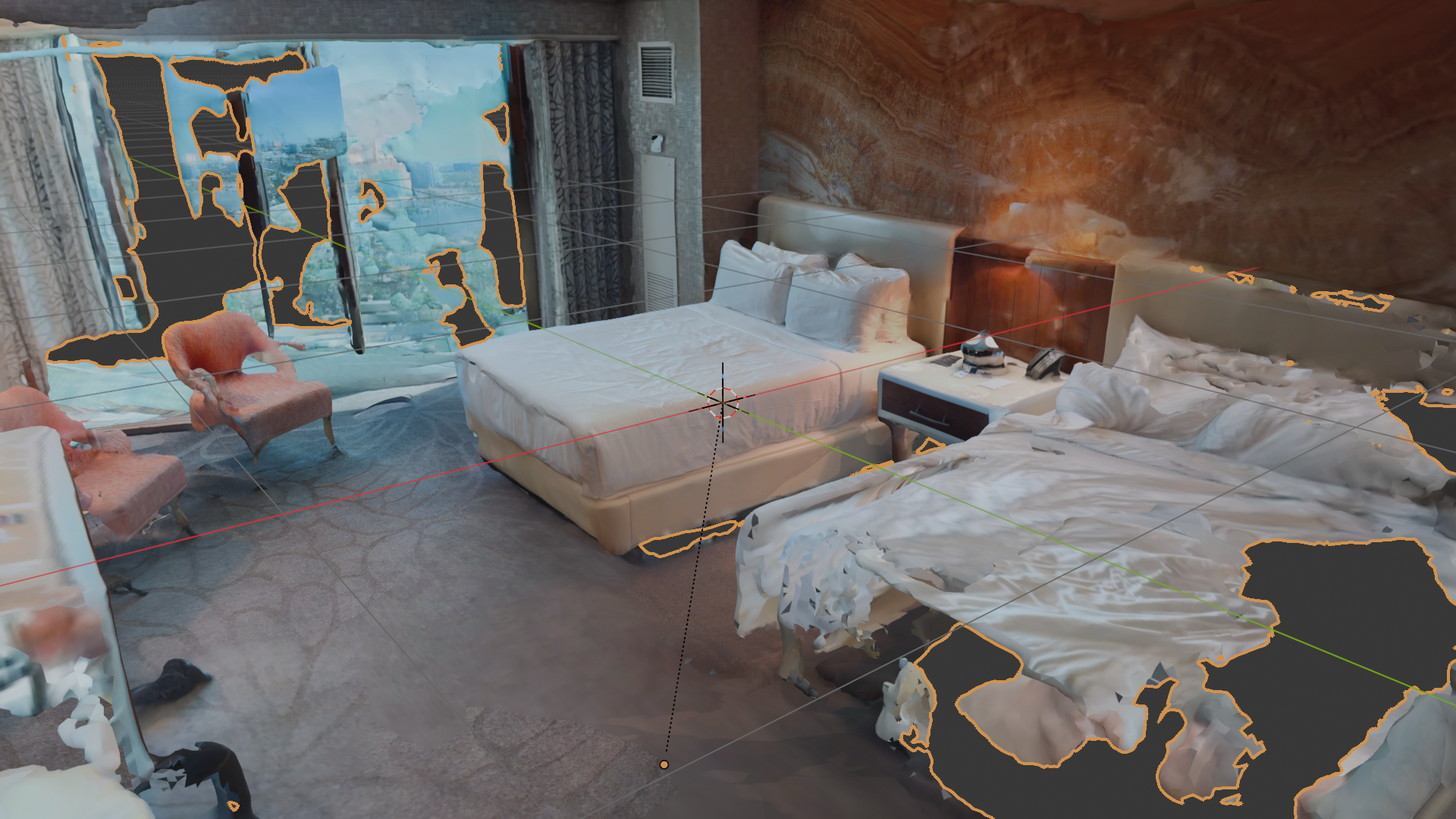
Compared with the cruise-promenade scan from day one, the improvement is not subtle. The bed reconstructs as a continuous surface instead of patchy fragments. The dresser keeps its right-angle edges. The painting on the wall retains enough texture detail to read as a real painting and not a smeared blob. The lamp on the nightstand survived the reconstruction with its shade intact. The single most important variable was capture pace, and the second most important was staying within about a meter of the surfaces I wanted to reconstruct cleanly.
The new failure mode
The improvement also surfaced a problem the day-1 patchy scan didn’t have, because the day-1 scan never tried to be a complete room.
I wanted an external screenshot of the room, looking down into the geometry from above. The scan included the ceiling, correctly, because rooms have ceilings. The ceiling makes the room a closed box from any external angle. Every external screenshot just shows the top of a featureless white volume.
The standard Blender fix is to hide the ceiling faces. Edit Mode, Face select, hover over a ceiling face, press L to select all linked faces. Expected: the whole ceiling lights up. Reality: maybe 5 to 10 percent of the ceiling lit up, because the scanned ceiling isn’t one continuous mesh. It is dozens of fragmented islands separated by tiny holes, the places the scan didn’t capture cleanly.
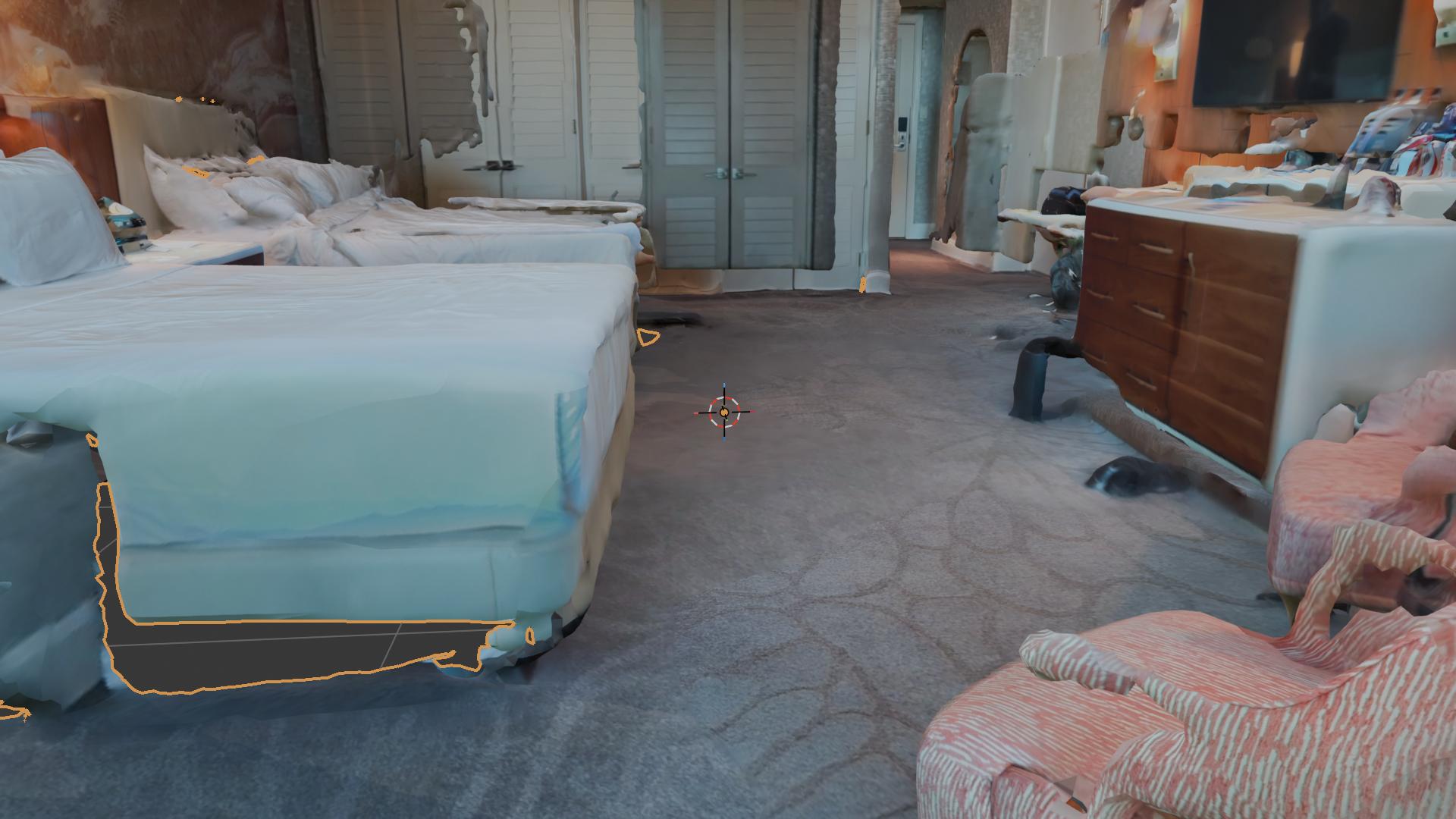
To actually select the whole ceiling I’d need to repeat L 20-30 times, picking each fragment by hand. Or use a box-select from a top-down view (still tedious with the fragmentation). Or write a Blender Python snippet that selects all faces above a Z-threshold (works, but is gatekept behind “know Blender’s Python API”).
I gave up on external screenshots. The interior camera angle (low, near a corner, looking diagonally across the room) renders beautifully, looks like a real-estate walkthrough frame, and doesn’t require any geometric surgery. The fix was to not try.
The meta-lesson here is that “second iteration friction” is a different category of problem from “first iteration friction” and most tutorials only cover the first kind. First-iteration friction is about getting the tool to produce any output at all. You install the app, fight the defaults, capture a thing, get a file on disk. The friction notes from day one are almost entirely in this category: which mode to pick in Scaniverse, which shading mode to switch to in Blender, how to get the camera to point at your geometry. These are valuable to document and they are the natural focus of getting-started content.
Second-iteration friction is about getting the output to be useful for whatever comes next downstream. You already know how to get a scan. Now you need the scan to behave a particular way when it lands in the next tool. You need the ceiling separable from the walls. You need stable prim names that survive re-export. You need the mesh non-fragmented so selection operations work as expected. None of this matters on attempt one, because attempt one ends when the file lands on disk. It all starts mattering on attempt two, when you try to act on the file. The tutorials rarely cover this category because it is by definition workflow-specific, and the tool authors do not know which downstream workflow you have in mind.
This is a real DevRel content opportunity. The first-iteration friction notes are useful and they are the necessary entry point to a learning journal. The second-iteration friction notes are where the actual value lives for engineers who have already done attempt one and now need to know what attempt two will surface. Most tooling content stops at attempt one. The honest version goes further.
Friction notes
Room scans with ceilings make external screenshots impossible, and the obvious DCC-tool fix doesn’t work. Scaniverse-output USDZ ceilings come back as fragmented mesh islands (holes break geometric continuity), so Blender’s “select linked” can’t grab the whole ceiling in one shot. You’d have to L dozens of pieces, or write a Python snippet to select by Z-threshold. Doc-fix: Scaniverse (and any LiDAR room-scan app) should optionally export ceiling, floor, and wall as separate prims in the USDZ so downstream tools can toggle visibility without geometric surgery. The whole real-estate and digital-twin workflow needs this. It is a one-line classification step at export time. Blender’s USD importer could also surface the prim hierarchy as separate collections when input has named subprims.
“Just slow down” is the right answer for capture quality, but the docs framing buries it. Scaniverse’s getting-started flow doesn’t say “your first scan will be bad and that’s normal, the technique pays off on attempt 2.” It treats every scan as equivalent. A real-world DevRel-shaped framing would be: “Like any new sensor workflow, your first 2-3 scans are calibration data. Here’s what you’ll learn from each one.” Doc-fix: add a short “first-scan expectations” page to the onboarding flow, with side-by-side examples of patchy-vs-complete coverage.
What this tells me about real-to-sim
The reason this matters for an NVIDIA Physical AI conversation isn’t the screenshot. It’s that the gap between “a scan exists” and “a scan is useful as a digital twin” is mostly about classification metadata, not geometry.
Geometry quality is solved. Modern phone LiDAR plus modern mesh reconstruction produces meshes that are good enough for downstream simulation. What’s not solved is the workflow assumption that scan outputs should arrive with semantic labels (ceiling, floor, wall, furniture, window) so downstream tools such as Blender, Omniverse, and Isaac Sim can act on them surgically.
This is exactly the kind of “boring infrastructure that unlocks the cool demo” problem network-engineering DevRel has spent the last decade on. NetBox didn’t take off because it stored device data; it took off because it provided the classification structure every other automation tool could read from. The same pattern feels like it’s missing in real-to-sim right now.
The longer version of this argument is that OpenUSD is positioned to be the classification substrate the real-to-sim workflow needs, and the work to make that happen is not technically interesting work. It is data-modeling work, schema work, convention work. It is the work of deciding that “Wall” and “Ceiling” and “Floor” and “Furniture” are first-class concepts that should appear as typed prims in the USD output of a room scan, instead of letting the entire room come back as one anonymous mesh that downstream tools have to re-segment by hand. Pixar built USD for film and animation, where the assets arrive with deep manual classification baked in by artists. The real-to-sim use case inverts that. The assets arrive raw from a sensor and need automated classification on the way in. The schemas for that classification are an unsolved problem and the convention layer on top of those schemas is even less solved.
This is the bridge from network-engineer DevRel mental models to physical-AI DevRel content, and it is the bridge I think I have something useful to say about. Network automation spent ten years figuring out that you cannot scale infrastructure work without a structured, declarative, queryable representation of what you are operating on. The lessons from that decade map almost line for line onto what real-to-sim needs to do over the next several years. The vocabulary will be different. The reference architectures will be different. But the load-bearing idea, that classification metadata is what unlocks the workflows everyone wants to do, is the same idea, and someone who has watched it play out once in network management has a useful seat at the table when it plays out again in physical AI.
What’s next
- Get the interior hero shot of the hotel scan saved and add it to this entry as the canonical image
- Back to OpenUSD code learning: Composition Basics chapter, then hand-redo
01_references.py - Tomorrow or Thursday: hand-write
compose_scene.pythat references the cruise-promenade USDZ AND a primitive composed on top. This is the “non-destructive pipeline” demo in its smallest possible form.
Find the canonical friction log and Python notes file in the prep repo at omniverse-learn/. Reach me on LinkedIn or via Sierra Code Co.