2026-06-04
From zero Isaac Sim to a cloud-streamed robotics + real-world-scan composition in one day
nvidiaisaac-simisaac-labbrevroboticsopenusdphysical-ailearning-log
The pivot from authoring USD by hand on a MacBook to running NVIDIA’s robotics simulation stack on a cloud L40S, with a real-world iPhone scan composed alongside an NVIDIA-provided robot in a single USD stage.
The pivot
The previous OpenUSD posts were about getting the substrate right. This one is about loading it into NVIDIA’s robotics simulator, training a robot in it, and proving the loop end to end. A line from a recent post keeps landing for me: digital twins aren’t a deliverable, they’re the precondition for iterating on real robots. You don’t cut metal until the robot has learned to walk in the metaverse. Fastest way to engage credibly with that is to actually do the loop at small scale. Three steps, one evening, under $30 of cloud spend. All three landed.
The afternoon: cloud cold-start to trained robot
NVIDIA bought Brev (a GPU rental platform) since I last looked, and shipped the Isaac Launchable: one-click deployment of a containerized Isaac Sim 5.1 plus Isaac Lab 2.3 environment, browser-streamed via WebRTC from an AWS L40S. No local GPU required.
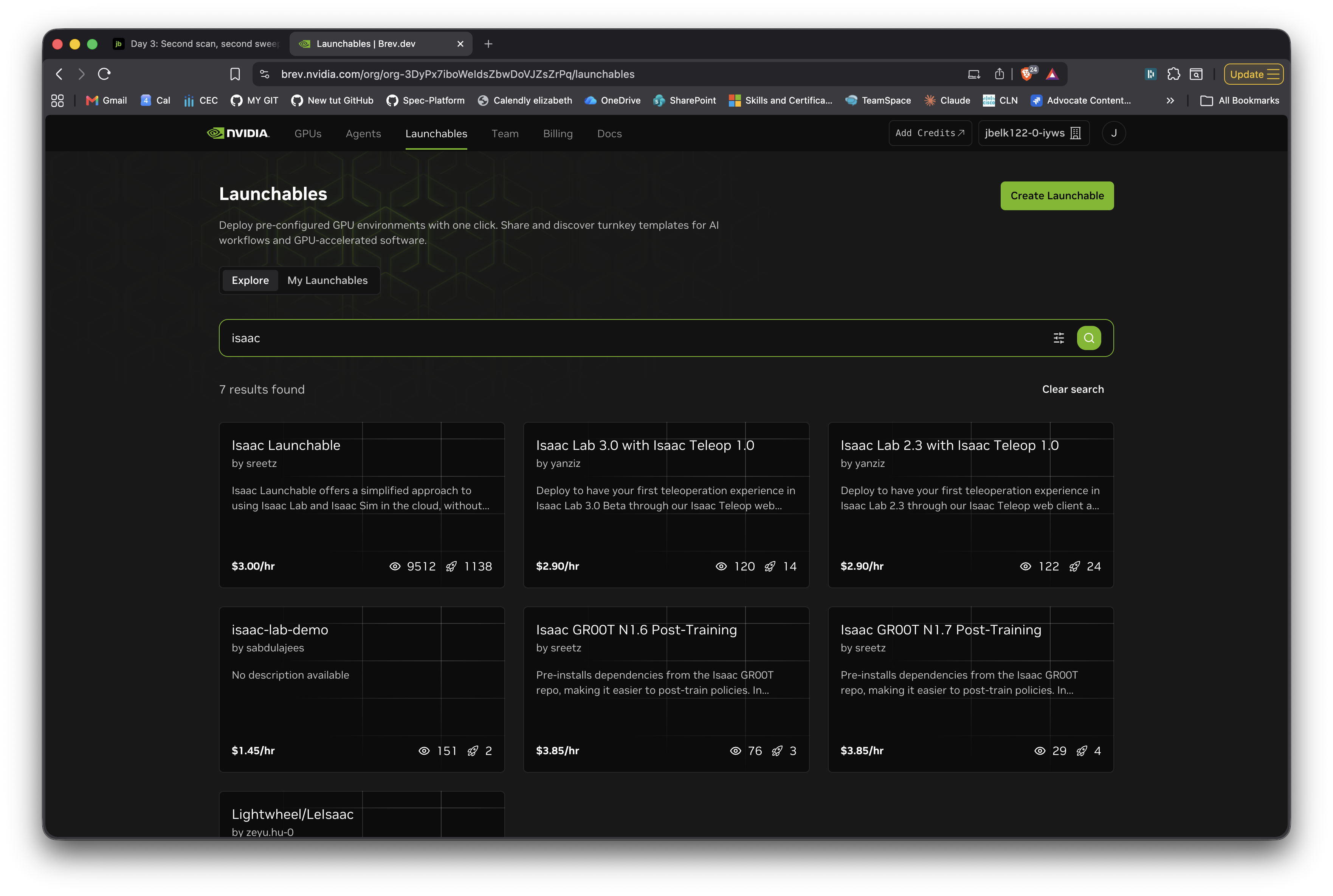
First deploy is about 25 minutes (provisioning is fast; the bulk is shader-cache warm-up). Subsequent starts are much faster because the cache persists.
Once the streamed viewer was alive, I ran the canonical Ant locomotion task. 8000 PPO iterations across 4096 parallel Ant simulations in roughly 2 minutes of wall-clock time on the L40S. Trained checkpoint saved automatically. Cost so far: under $1 of compute.
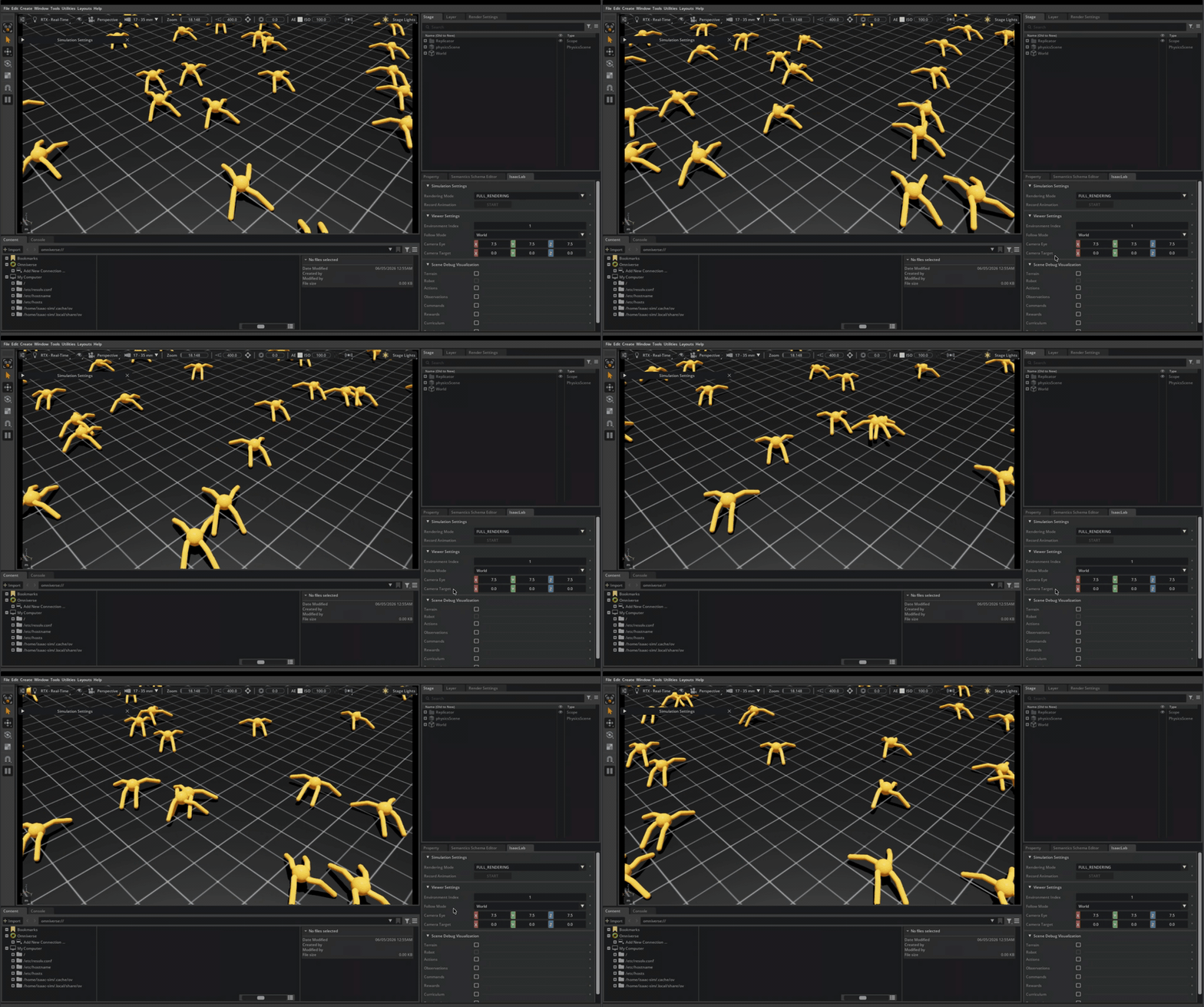
Going from zero prior robotics-RL experience to a working quadruped locomotion policy in 2 minutes on a cloud GPU, for less compute spend than a coffee. That’s the cost-per-experiment story behind why robotics R&D has been moving the way it has the last couple of years.
The evening: composing the real-world scan with the robot
Training the Ant on flat ground proves you can do robotics on the cloud. The more interesting bit is bringing real-world geometry in alongside it. That’s where the OpenUSD work from the previous posts connects.
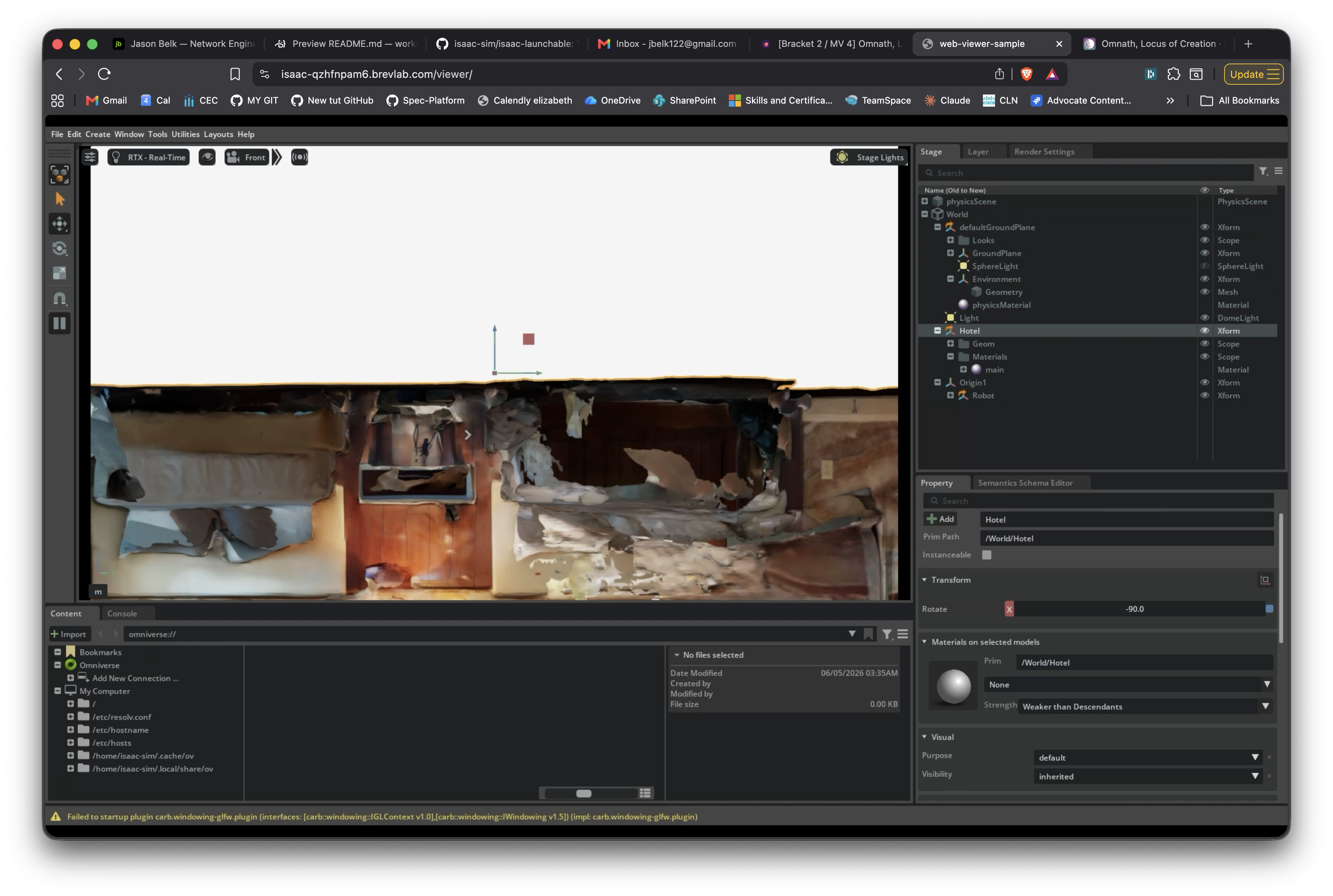
I uploaded my hotel scan from the previous post (hotel.usdz, an iPhone LiDAR capture exported by Scaniverse) into the running Isaac Sim instance, wrote a Python script that referenced both the hotel and the NVIDIA-provided Ant robot into a single USD stage, and rendered the composed scene via the same browser-streamed viewer.
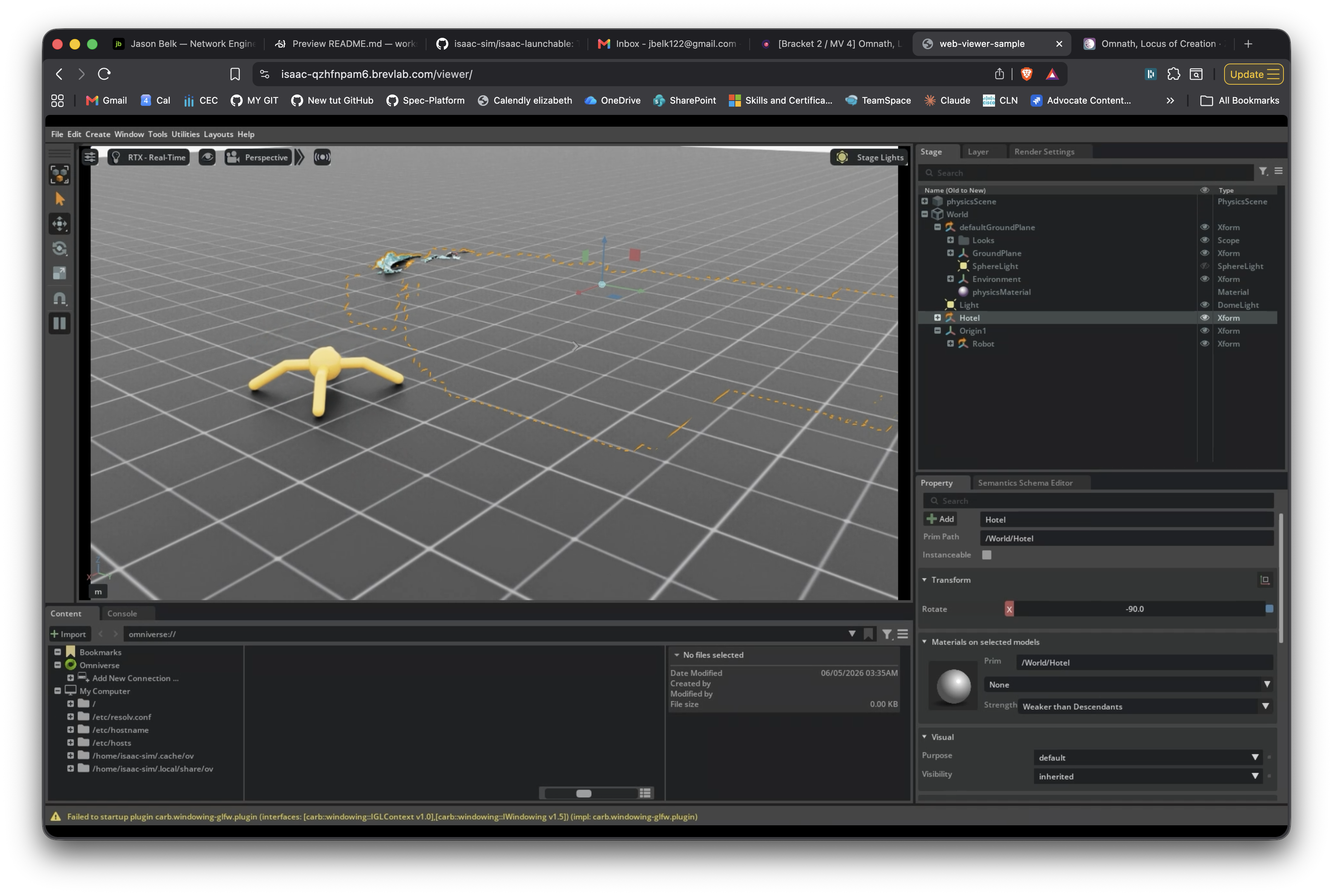
Hotel and Ant are both authored as USD references into one stage. The Hotel gets a 90° X rotation to flip Scaniverse’s Y-up convention into Isaac Sim’s Z-up, plus a translate to lift its floor to match the ground plane. The Ant lives under an Xform parent at /World/Origin1/Robot, which is the canonical Isaac Lab prim-path pattern. A DomeLight provides ambient illumination so the Ant’s PBR materials read correctly.
The friction notes that matter
Short list by design. Three are filed as a single GitHub issue against isaac-sim/isaac-launchable. They’re documentation and UX gaps observable in the first 30 minutes of any cold-start deploy, before writing any custom code. One more is out-of-scope-for-the-launchable but worth noting.
The in-instance README points to a directory that doesn’t exist at the host level. The README says cd /workspace/isaaclab && ./isaaclab.sh -p .... That works in the web VS Code terminal. SSH in via brev shell <instance> and the closest-named directory on the host is ~/isaac-launchable/isaac-lab/ (with a hyphen) and it contains docker-compose infrastructure files, not the framework. The framework lives inside a container. Web users succeed; SSH users get “no such file or directory” or wander into the wrong directory. Doc-fix: unify the directory names across README, web VS Code mount, and host filesystem. Filed as issue #10.
The in-instance README and the GitHub README disagree on the hello-world. GitHub’s positions Ant RL training as the canonical first-run example. The in-instance one positions create_empty.py instead. Both demos work; both make sense as introductions. But reading one before deploying and the other after, you have no way to know which “first step” to follow. Doc-fix: pick one canonical first-run and use it consistently across both READMEs. Filed as issue #10.
Web VS Code opens a generic Microsoft walkthrough as the first tab, not the launchable’s README. Deploy completes, you open the web VS Code URL, and the first tab is “Get Started with VS Code for the Web” (theme picker, command-palette intro, nothing about Isaac). The launchable’s actual README isn’t surfaced until you manually close the walkthrough. For a paid first-time launchable, that’s a wrong default. Doc-fix: one code-server settings change to dismiss the walkthrough and open README.md instead. Filed as issue #10.
Isaac Sim 5.1 renamed the omni.isaac.* Python namespace to isaacsim.*. Every tutorial, blog post, and Stack Overflow answer published before the rename uses the old namespace and emits a wall of deprecation warnings on first run. The launchable’s README doesn’t link the migration guide. New users following any external tutorial hit this immediately. Doc-fix: the README’s first paragraph should add a one-line pointer to the namespace migration guide. Not filed against the launchable since it crosses the upstream Isaac Sim boundary.
What this means
Getting this loop working in one evening on a cloud GPU for under $30 told me one thing: the friction left in the path is documentation and onboarding, not capability. Hardware works, simulator works, training works, composition works. Where I got stuck was almost always “the canonical pattern isn’t surfaced in the launchable’s docs, only in upstream Isaac Lab examples.” That’s a fixable problem, and it’s the kind of work I’ve spent 14 years on the DevRel side of.
The three first-deploy friction notes above are filed at issue #10. The custom-script friction I hit later (ISAAC_NUCLEUS_DIR = None, prim_path needing an Xform parent) traces back to my own deviations from the canonical IsaacLab pattern, so those were left out.
Transparency note: the OpenUSD work in the previous posts was hand-written, because the goal was building a real mental model of USD. Today was different. The Isaac Sim cold-start scripting, Articulation API debugging, and scene composition all leaned on Claude Code. Timeline plus operational complexity: I had the USD assets ready, needed the cloud pipeline working in one evening, and the debugging surface (Isaac Lab APIs, USD instancing semantics, Hydra rendering, carb settings, the launchable’s containerized layout) was bigger than I’d plausibly poke at by hand in that window. The friction notes are mine, hit in real time. The Python plumbing was AI-assisted.
Reach me on LinkedIn or via Sierra Code Co.